

Matches
Each match links a watched entity to the episode it was found on, with the evidence that triggered it.List matches
after and before — both exclusive bounds on detected_at. A bare date is parsed as midnight UTC, so to include a whole day set before to the next day (the call below captures all of June 1 through June 9):
Response (truncated)
ENTITY_MENTION matches carry mention_count, mention_variants, and the mention windows. PODCAST_SPEAKER matches carry roles and report the entity’s spoken-line count in mention_count. windows are present on both when the match is hydrated (the single-match and detailed delivery views below).
The matches list reflects the alert’s filters: if you configured languages, relevance, source_popularity, or speaker_roles, this endpoint only returns matches that survive the current filter set — the same set the emails carry. Two consequences worth knowing:
relevanceandsource_popularityare applied at read time. Tightening either filter hides matches that no longer satisfy it; loosening it brings them back. The underlying match rows are unchanged.languagesandspeaker_rolesare applied at detection AND backfill. Tightening either filter hides existing matches the same way, but loosening one does not surface older matches that were excluded — those matches were never written, because the post-create historical sweep and the live matcher both gate on these axes before creating rows. Treat narrowing on these axes as a one-way trim of historical coverage.
Backfill
When an alert is created, Particle sweeps the previous 7 days and writes any matches the live pipeline would have produced, so the alert isn’t empty on day one. These are flaggedis_backfilled: true with detected_at set to the episode’s publish time, and they never trigger an email — only matches detected after creation are delivered.
Deliveries
The deliveries log is the email audit trail for an alert — one row per send attempt.Response (truncated)
status is one of SENT, FAILED, or SKIPPED, and error_message carries the detail for anything that isn’t a clean success — so check it even when status is SENT:
SENT— the email was sent. If some recipients failed on a digest, the status staysSENT(so those who got it aren’t re-emailed) anderror_messagerecords the partial failure, e.g.2/5 recipients failed.FAILED— no recipient received the email;error_messagehas the reason, and the send is retried.SKIPPED— no email was attempted (for example, the alert has no email recipients);error_messageexplains why.
match_count: 1; a daily or weekly digest groups its whole window into one delivery with a higher match_count. Each delivery embeds a lightweight summary of the matches it included — for the full transcript excerpts, fetch the delivery’s shareable page or the individual matches.
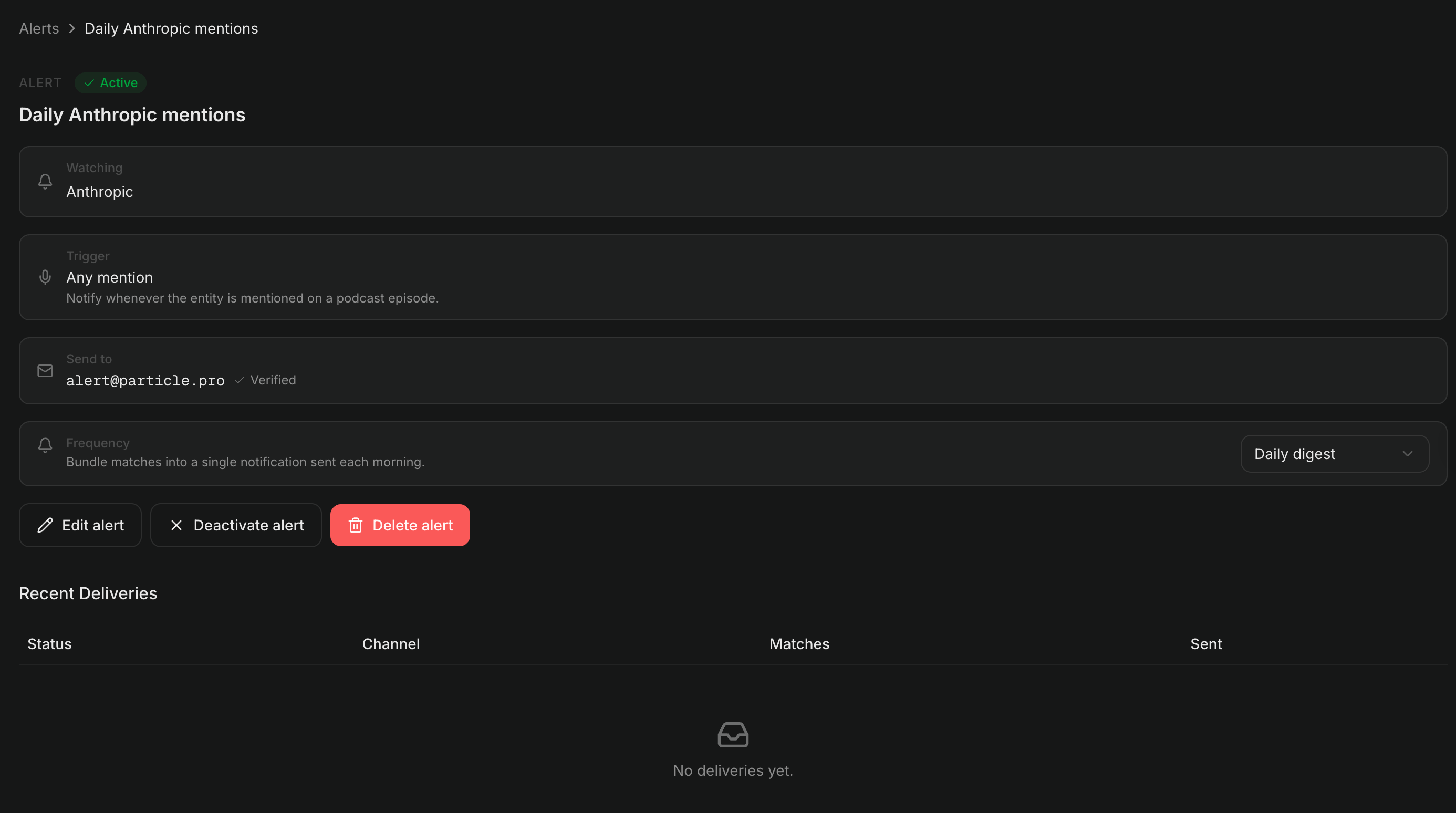
An alert's detail page shows its configuration and a recent-deliveries log.
Shareable result pages
Two API endpoints return a single result on its own — fetch one delivery or match by ID, without the parent alert:GET /v1/alerts/deliveries/{id}— one delivery and the matches it containedGET /v1/alerts/matches/{id}— one match, fully hydrated
api.particle.pro) also back the human-readable landing pages the platform renders for the View in browser and per-result links in alert emails — those email links point at platform.particle.pro, not the API.
- The alert’s owners get the full payload: transcript
windows, mention variants, and speaker roles. An API key qualifies only if it’s scoped to the alert’s project — a key from another project, even in the same organization, gets the reduced payload; a signed-in user qualifies if they’re a member of the alert’s organization. On the single-match endpoint (GET /v1/alerts/matches/{id}) owners also get the match’sdeliveriesarray — the per-channel send audit — which is stripped for everyone else. - Everyone else gets a reduced public payload — the entity, the episode metadata,
detected_at,mention_count, and the AI summary — enough to render a result card, with the internal scoring and configuration stripped.
view controls excerpt depth for members: summary (default) omits transcript windows; detailed includes them. Use detailed to render a full results page where each match expands to the spoken excerpt.
Stop delivery
Two ways to stop an alert:- Pause it —
PATCH /v1/alerts/{id}withis_active: false. The alert keeps its history and can be resumed. See Update, pause, and delete. - One-click disable from an email — every alert email has a Disable this alert link in its footer carrying a single-use token. Opening it shows the alert it controls; confirming flips
is_activetofalse. The recipient doesn’t need a Particle account — token possession is the access factor. Replaying an already-used link is harmless: it returns the alert’s currentis_activestate with analready_disabledflag, so an alert that was re-enabled after the first click correctly shows as active again.
Related
- Alerts overview — concepts, alert kinds, and the plan requirement
- Create and manage alerts — resolve an entity, preview, create, update
- Transcripts → Mentions — the dialogue-window shape that match excerpts mirror